Flexible reports, vehicle price history, and mobile service maps
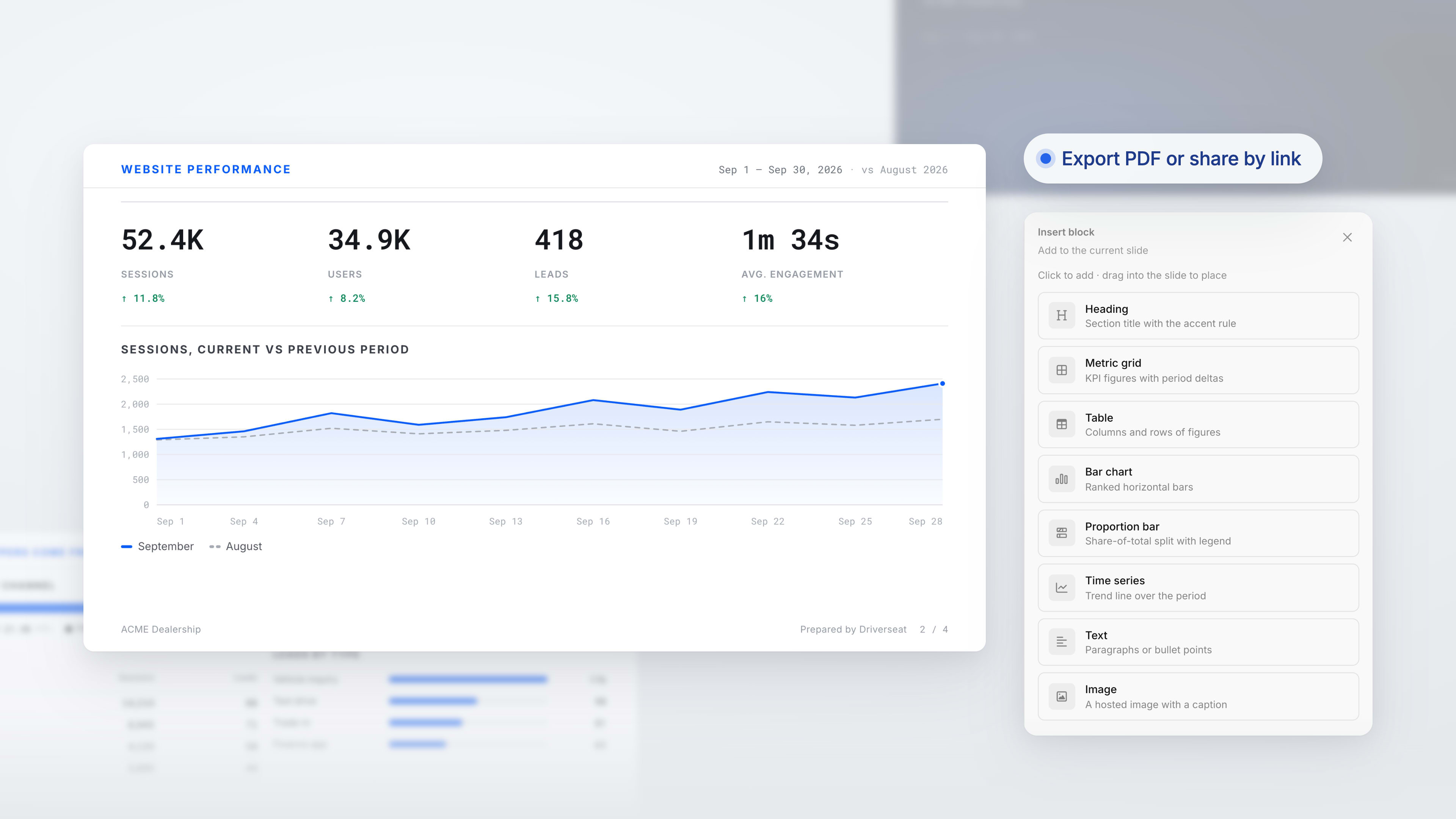
Build and share slide reports
You can now create reports from website, paid search, or paid social templates, or start with a blank deck. Arrange charts, metrics, tables, images, and written insights, then export a PDF or share the report by link or email. Finalizing a report preserves the version your team reviews.
See how vehicle prices have changed
We've added a pricing history to each vehicle's Advanced section, showing recorded changes with before-and-after values and the time of the feed update. It covers price, MSRP, discounts, and incentives where that history is available, making pricing questions easier to trace.
Put mobile service coverage on the map
A new page-builder section lets you display mobile service areas on an interactive map. Shoppers can select an area to see the responsible dealership or department, availability details, and a scheduling link.
Other improvements
Add a secondary logo beside your main brand, with its own link, an optional divider, and a separate footer display setting.
Choose whether an offer appears on matching inventory cards, vehicle detail pages, or both, and define its eligible vehicles.
Find page-builder rows through a clearer category browser with search, previews, and frequently used rows from your site.
Connect the CarEdge chat widget from integration settings and choose its label and placement.
Bug fixes
Fixed text selection in the blog editor sometimes dragging an entire content block.